All Categorys

ABB Robot Parts
KUKA Robot Parts
FANUC Robot Parts
YASKAWA Robot Parts

All Small Categorys

ABB Robot Parts
KUKA Robot Parts
FANUC Robot Parts
YASKAWA Robot Parts

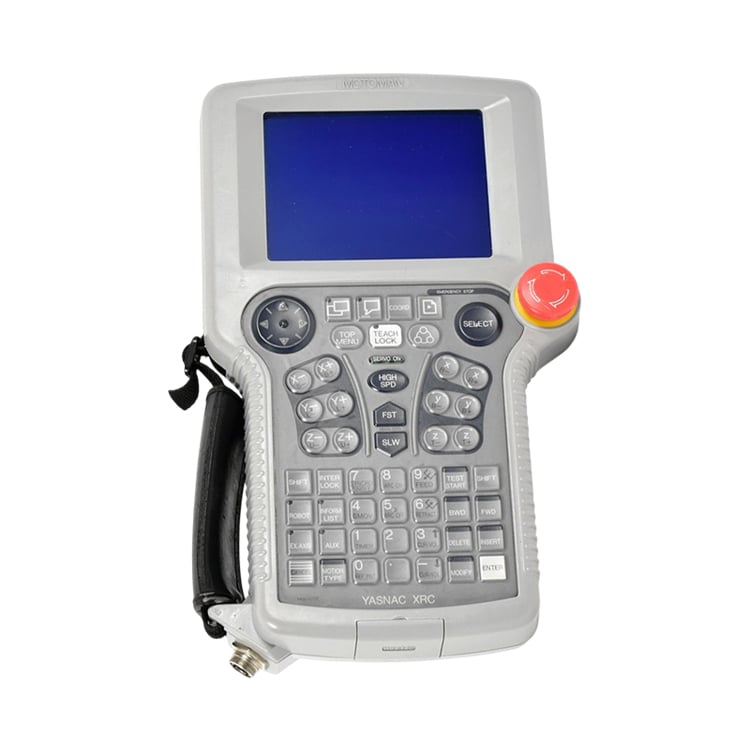
Yaskawa JZNC-XPP02B Motoman XRC Teach Pendant

Product Condition New original or used original. Please confirm the condition with us before ordering.
Shipping Ships from Shanghai, China. Typical delivery lead time is 3-5 working days after order confirmation, via DHL / FedEx / UPS with secure protective packaging for sensitive electronics. Actual lead time depends on the specific condition and stock status confirmed with us.
Buyer Benefits
  • Genuine Yaskawa JZNC-XPP02B teach pendant for the Motoman XRC robot controller — the operator handheld for programming and manual control, not a generic HMI panel.
  • 32-bit XRC 2001 controller interface with an LCD display, 3-position enabling (deadman) switch and emergency-stop for safe teach operation.
  • The official Motoman listing describes it as "PENDANT, PROGRAMMING, XRC CABLE OBS" (Motoman P/N 142136-1); the pendant cable length is not documented consistently — one listing states a fixed 3 m cable, another approx. 8 m, and 7 m replacement cables are also sold, so confirm the exact length against your pendant label.
  • Fit-confirmation support: we check your XRC controller generation (XRC / XRC 2001) before you order — this pendant is not compatible with DX100 / NX100 / YRC1000 controllers, so verification avoids wrong-generation returns.
  • Each unit is inspected and packed with full order tracking from Shanghai.
Item Location Shanghai, China
Payment We accept PayPal, T/T (bank transfer), and Alibaba Trade Assurance.
  • Description
Can’t Find Your Part?

12,000+ parts in stock,Tested before shipping,Reply within 24 hours

Inquiry

Programming Pendant for Yaskawa Motoman XRC Controllers

Specifications

Part Number JZNC-XPP02B
Manufacturer P/N 142136-1 (Motoman catalog number — official Motoman listing "PENDANT, PROGRAMMING, XRC CABLE OBS")
Brand Yaskawa
Category Robot teach pendant (programming pendant) for Yaskawa Motoman XRC robot controllers.
Definition The handheld operator terminal that connects to a Yaskawa Motoman XRC controller to perform robot programming, manual jogging, teach-in and diagnostics at the cell.
Function Provides local robot programming, manual jogging, I/O monitoring, parameter editing and diagnostic access through the XRC controller connection, with an integrated 3-position enabling (deadman) switch and emergency-stop for safe teach operation.
Controller Compatibility Yaskawa Motoman XRC / XRC 2001 controller family. Not compatible with DX100 / NX100 / YRC1000 controllers — confirm your controller model and revision before ordering.
Architecture 32-bit XRC 2001 processor (per parts listings) — the XRC is an older 32-bit robot controller generation, distinct from later DX100 / NX100 / YRC1000 pendants.
Supplied With Pendant cable — the supplied length varies by unit (3 m and 8 m are both seen), and 7 m replacement cables are sold separately. Confirm the exact cable length against your pendant label before ordering.
Display LCD display. Confirm the size and colour type on your unit.
Keypad / Interface Membrane keypad with dedicated function keys (some listings also cite a touch screen); 3-mode selector switch (Teach / Play / Remote) for teach operation.
Safety Devices 3-position enabling (deadman) switch and a red emergency-stop button; meets IEC 60204-1 / ISO 10218-1 safety compliance.
Power Supply 24 VDC. Confirm on your unit.
Programming Language Supports Yaskawa INFORM robot programming.
Ingress Protection Confirm with your unit nameplate.
Dimensions Confirm with your unit nameplate.
Net Weight Confirm with your unit nameplate.
Operating Temperature Confirm with your unit nameplate.
Country of Origin Japan. Confirm against the nameplate.
Condition New original or used original. Please confirm the condition with us before ordering.

Industrial Applications

  • Replacing a damaged or non-responsive programming pendant on a Motoman XRC robot cell.
  • On-site robot program creation, editing and job management (INFORM) at the production cell.
  • Manual jogging and teach-in of robot positions during setup, changeover and fixture alignment.
  • Real-time diagnostics — I/O monitoring, alarm review and status interaction through the XRC controller.
  • Operating-mode selection (Teach / Play / Remote) and safety-interlock control during commissioning and service.
  • Service across arc and spot welding, material handling / palletizing, machine tending and paint / coating cells built on Yaskawa XRC controllers.

Design Purpose

The XRC programming pendant is the handheld human interface that sits between the operator and the XRC controller — not a generic touch panel. Robot work at the cell needs a device that is always local, rugged and safety-rated: the operator holds it while standing next to the robot, so it must survive drops, dust and daily abuse while remaining safe to use. That is why it is a purpose-built pendant on a controller-connected cable rather than a laptop or tablet.

The safety architecture is the core of the design. A three-position enabling (deadman) switch and a hardwired emergency stop mean the robot can only move while the operator is actively and consciously holding the pendant in the safe state — release it and motion stops. Programming, jogging and diagnostics then all flow through one controller-connected device, keeping the cell operable even when the network or office PC is not. Because the pendant is tied to the XRC controller generation and its cable / connector, and because the Yaskawa pendant family spans several generations (XRC, DX100, NX100, YRC1000), selection must match the installed system rather than just the enclosure appearance. The XRC pendant (JZNC-XPP02B) is not compatible with DX100 / NX100 / YRC1000 controllers — tell us your controller generation and we will point you to the correct pendant.

Before you order and before you install
  • Confirm the controller model: this is the Yaskawa XRC programming pendant (JZNC-XPP02B, Motoman P/N 142136-1). If your controller is DX100 / NX100 / YRC1000, the connector, cable and firmware differ — it is not compatible. Tell us so we point you to the correct pendant.
  • Verify the generation: confirm whether your controller is XRC or XRC 2001 on the controller nameplate before ordering, since the pendant family spans both.
  • Check the cable: the supplied length varies by unit (3 m and 8 m are both seen) and 7 m replacement cables are sold for the JZNC-XPP02B — confirm the exact length against your pendant label before ordering.
  • Inspect on arrival: check the pendant cable, both connectors, the LCD, the keypad, the emergency-stop and the enabling device before use; report any damage before installation.
  • Back up first: back up the robot program and configuration before swapping the pendant.
  • Isolate where required: follow the applicable Yaskawa XRC controller service manual and use qualified personnel for any controller-side work.
  • Confirm the condition with us: tell us whether you need new, used or refurbished before ordering.

Common Failure Modes

  • Loss of communication with the controller — the pendant shows "no connection" or fails to boot, often from a damaged pendant cable or connector. Related troubleshooting: see our article on "Yaskawa Motoman XRC Teach Pendant Communication Loss With Controller".
  • LCD failure or no display — a worn or contaminated LCD panel. Related troubleshooting: see our article on "Yaskawa Motoman XRC Pendant LCD No Display Fix".
  • Keypad / key not responding — worn or contaminated membrane keys after high-cycle use. Related troubleshooting: see our article on "Yaskawa XRC Teach Pendant Keypad and Key Repair".
  • Cable damage from repeated bending — the pendant cable breaks internal wires at forced bends. Related troubleshooting: see our article on "Yaskawa XRC Pendant Cable Replacement".
  • Deadman (enable) switch failure — a worn 3-position enabling switch stops the pendant from enabling motion. Related troubleshooting: see our article on "Motoman XRC Deadman Switch Safety Fault Test".
  • Emergency-stop button stuck or unresponsive — a hardwired safety device that must be tested before use. Related troubleshooting: see our article on "Yaskawa XRC Pendant Emergency Stop Fault Diagnosis".

Alarm codes for the teach pendant itself are displayed on the controller rather than on the pendant — communication or boot faults normally appear as XRC controller-side messages. If your controller displays a fault code, contact us with the exact code shown for accurate diagnosis.

Why Choose Us

  • Specialized in industrial robot spare parts and consumables for ABB, FANUC, KUKA and YASKAWA.
  • We supply the exact Yaskawa article JZNC-XPP02B (XRC programming pendant, Motoman P/N 142136-1), matching the number in your controller record.
  • We verify the XRC controller model and generation before you order, so you receive the correct XRC-generation pendant rather than a DX100 / NX100 / YRC1000 unit.
  • Each pendant is inspected and functionally checked, then packed to protect the screen, cable and safety devices, with full order tracking from Shanghai.
  • Technical support available for installation, compatibility check and troubleshooting; repair service offered for defective teach-pendant units.
  • Quote-based service — send your inquiry with the controller model, serial number and required condition for a matched offer.

Related Products

Online Inquiry

If you have any suggestions, please contact us

Contact Us
IT'S SUPPORTED BY

Copyright © SongWei Robotics All Rights Reserved  -  Privacy Policy