
| Product Condition | New original or used original (Grade A). Please confirm the condition with us before ordering. |
| Shipping Information | Worldwide shipping via DHL, FedEx, and UPS. 3-5 working days to most destinations. Packed with protective film and a reinforced carton. |
| Buyer Benefits |
|
| Item Location | Ships from Shanghai, China. Lead time confirmed with your inquiry. |
| Payment Information | PayPal, T/T, and Alibaba Trade Assurance accepted. Send your inquiry for a quotation. |
12,000+ parts in stock,Tested before shipping,Reply within 24 hours
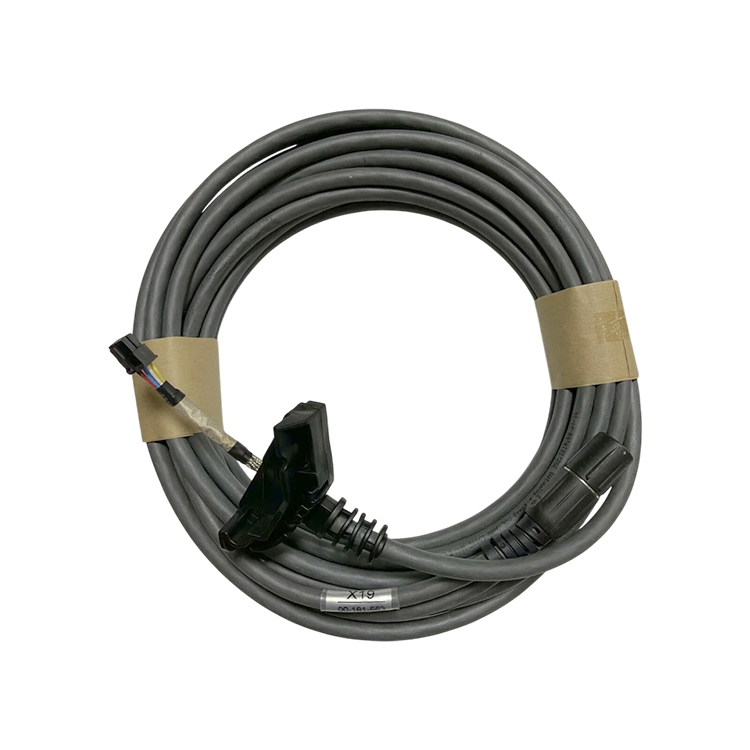
InquiryThe KUKA 00-181-563 is the connecting cable for the smartPAD teach pendant. It is the 10 m cable that runs between the smartPAD 00-168-334, also known as the KCP4, and the X19 connection on the KRC4 robot controller. The cable has a plug-in connection at both ends, which is what allows it to be used as a connecting cable or as an extension cable for the smartPADs of the matching version. Because one cable carries the whole pendant link, a damaged cable does not stay a display problem: it takes the pendant off the controller, and the controller reports the loss of the operator control device while the robot is in motion. Send us the article number on the cable in your cabinet or the controller serial number, and we confirm the match before you order.
| Manufacturer | KUKA (original spare part) |
| Part Number | 00-181-563 |
| Catalogue name | smartPAD connecting cable, 10 m |
| Type | Connecting or extension cable for the smartPAD teach pendant |
| Length | 10 m |
| Connection | Plug-in connection at both ends |
| Cabinet side connection | X19 on the KRC4 robot controller |
| Pendant | smartPAD 00-168-334 (KCP4) on the KRC4 controller |
| Application | Programming, teaching and operation of the KRC4 robot with the smartPAD |
| Condition | New original or used original (Grade A). Please confirm the condition with us before ordering. |
| Details confirmed before supply | The length, the connector version and the pendant type are confirmed against the cable in your cabinet before we ship. Send us the article number on the cable or the controller serial number. |
Send the article number printed on the cable label, the controller serial number or a photo of the connector, and we confirm the match before you order.
The smartPAD is the operator interface of the KRC4 controller, and it is also the device that carries the emergency stop of the pendant, the enabling switch and the mode selector. All of that runs through one cable, which is why a pendant cable is a safety relevant part and not just a data lead. The 10 m length of this article number is what makes it the standard pendant link for a cell: it reaches from the cabinet to the far side of the robot without the operator having to drag the cabinet around, and because the connection is a plug-in at both ends, the same cable can be laid as an extension when the geometry of the cell needs more reach. The cabinet side of that link is the X19 connection on the KRC4, and the KUKA controller documentation describes the signals that run over it: the 24 V supply for the pendant, the ground, the transmit and receive pairs, and the two inputs that report whether the smartPAD is plugged in on side A and on side B. Those last two signals are why the controller knows the pendant is present, and why the loss of the cable produces a controller message about the operator control device rather than a simple screen error. The same documentation also sets out the safety consequence that follows from a disconnected pendant: once the smartPAD is unplugged, the emergency stop on the pendant no longer switches the system off, so an external emergency stop has to be connected to the controller and the unplugged pendant has to be taken out of the cell so that it cannot be mistaken for a working one. That is also the reason a pendant cable is replaced as a complete part rather than repaired, and the reason the article number and the pendant it came from are what we confirm before a replacement is shipped.
When the pendant does not work, the cable is the first thing to check, because a pendant cable failure is the most common cause of a pendant that will not come on. The checks that separate a cable fault from a fault inside the pendant are whether the fault changes when the cable is moved, whether the connector on the cabinet side is seated and free of damage, and whether the pendant behaves differently on a second robot with the same controller software version. Please contact us with the fault code shown on your controller for an accurate diagnosis of your cabinet. Two points are worth keeping in mind. First, the KUKA operating instructions set out the sequence for the pendant itself: the disconnect button is pressed, the plug is removed within the countdown, and after the pendant is plugged back in the controller needs about 30 seconds before the emergency stop and the enabling switch have to be tested again. A pendant cable that is replaced without that test is only half the work, because the pendant carries the emergency stop and the enabling switch. Second, a pendant that has been unplugged has to be removed from the cell so that it cannot be confused with a working one, and the cell needs an external emergency stop for as long as the pendant is out of it.
Request a quote: send your part number (00-181-563) or the controller serial number, and we confirm the version, the fit and the lead time before you order.
If you have any suggestions, please contact us
Contact Us
