
| Product Condition | New original or used original. Please confirm the condition with us before ordering. |
| Shipping | Ships from Shanghai, China. Typical delivery lead time is 3-5 working days after order confirmation, via DHL / FedEx / UPS with secure protective packaging for sensitive electronics. Actual lead time depends on the specific condition and stock status confirmed with us. |
| Buyer Benefits |
|
| Item Location | Shanghai, China |
| Payment | We accept PayPal, T/T (bank transfer), and Alibaba Trade Assurance. |
12,000+ parts in stock,Tested before shipping,Reply within 24 hours
Inquiry| Part Number | JZRCR-YPP21-1 |
| Brand | Yaskawa |
| Manufacturer Part Number | 167088-1 |
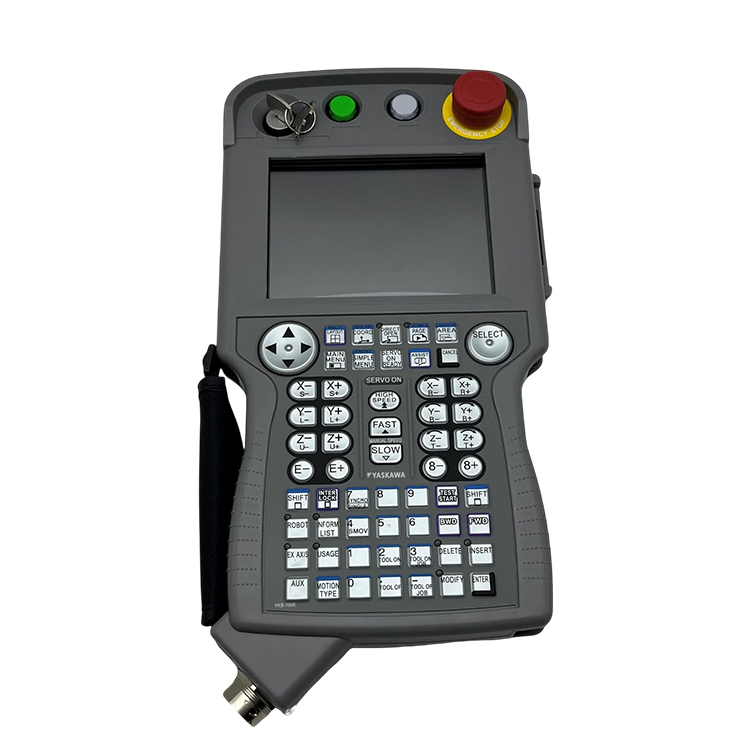
| Category | Robot operator teach pendant (programming pendant / HPU) for Yaskawa Motoman robot controllers. |
| Definition | The handheld operator terminal that connects to a Yaskawa Motoman DX200 controller to perform robot programming, manual jogging, teach-in and diagnostics at the cell. Yaskawa identifies JZRCR-YPP21-1 as the DX200 teach pendant (Manufacturer P/N 167088-1), supplied with the pendant cable. |
| Function | Provides local robot programming, manual jogging, operating-mode selection and diagnostic access through the DX200 controller connection, with an integrated 3-position enabling (deadman) switch and emergency-stop for safe teach operation. |
| Controller Compatibility | Yaskawa Motoman DX200 controller family. Commonly used on DX200 robots such as the MA1400, MA1900, VA1400, HP20D, MH5, MH12, MH24 and ES165D. Confirm your controller model and revision before ordering — the connector and cable differ for NX100 / XRC / FS100 / YRC1000. |
| Supplied With | 8 m pendant cable (YRC061-1) for direct connection to the DX200 controller cabinet. |
| Display | 5.7-inch color LCD with integrated keypad. |
| Overlay | Not included. Optional overlays by application: YKS-700E (general), YKS-701E (arc welding), YKS-702E (handling). Tell us your application so we supply the matching overlay. |
| Net Weight | Information not officially documented consistently — sources list between ~0.3 kg (handheld only) and ~2.8 kg (with 8 m cable). Please confirm with your unit or consult the manufacturer. |
| Dimensions | Information not officially documented consistently — one source lists approx. 169 × 314.5 × 50 mm. Please confirm. |
| Country of Origin | Information not officially documented. Please provide more details or consult the manufacturer. |
| Condition | New original or used original. Please confirm the condition with us before ordering. |
The teach pendant is the handheld human interface that sits between the operator and the DX200 controller — not a generic touch panel. Robot work at the cell needs a device that is always local, rugged and safety-rated: the operator holds it while standing next to the robot, so it must survive drops, dust and daily abuse while remaining safe to use. That is why it is a purpose-built pendant on a controller-connected cable rather than a laptop or tablet.
The safety architecture is the core of the design. A three-position enabling (deadman) switch and a hardwired emergency stop mean the robot can only move while the operator is actively and consciously holding the pendant in the safe state — release it and motion stops. Programming, jogging and diagnostics then all flow through one controller-connected device, keeping the cell operable even when the network or office PC is not. Because the pendant is tied to the DX200 controller generation and its cable / connector, selection must match the installed system rather than just the enclosure appearance. The DX200 pendant is not compatible with NX100 / XRC / FS100 / YRC1000 controllers, which is why controller verification matters before you order.
Specific alarm codes for the teach pendant itself are not officially documented by Yaskawa — communication or boot faults normally appear as DX200 controller-side messages. If your controller displays a fault code, contact us with the exact code shown for accurate diagnosis.
If you have any suggestions, please contact us
Contact Us
