
How to Solve Fanuc Robot Alarm SRVO-050?
For those who use Fanuc industrial robots, it is very likely that they have encountered the headache of the SRVO-050 Collision Detect alarm. Many operators or newcomers to the industry, as soon as they see this error popping up on the screen, the first reaction is definitely: “Bad, the robot crashed!” And then rushed to the scene to see. But the funny thing is, to the scene to take a closer look, the robot around the empty, with the workpiece, workpiece away from the old, there is nothing touching. What's even more frustrating is that you reset it, it can move two times, but not a few steps and “pop” a pop this alarm.
If you have been in the maintenance shop for a long time, you will realize that this kind of “phantom collision” is actually more common than a real crash. If you run into this situation, regardless of the three seven twenty-first to change the program or blindly change the servo motor, in the end, it is basically time-consuming, laborious and spend a lot of money.
Today, in conjunction with Fanuc's official investigation logic, let's talk about what's going on with this SRVO-050, and how to find out the real culprit step by step in the case where the robot does not crash and also reports an error.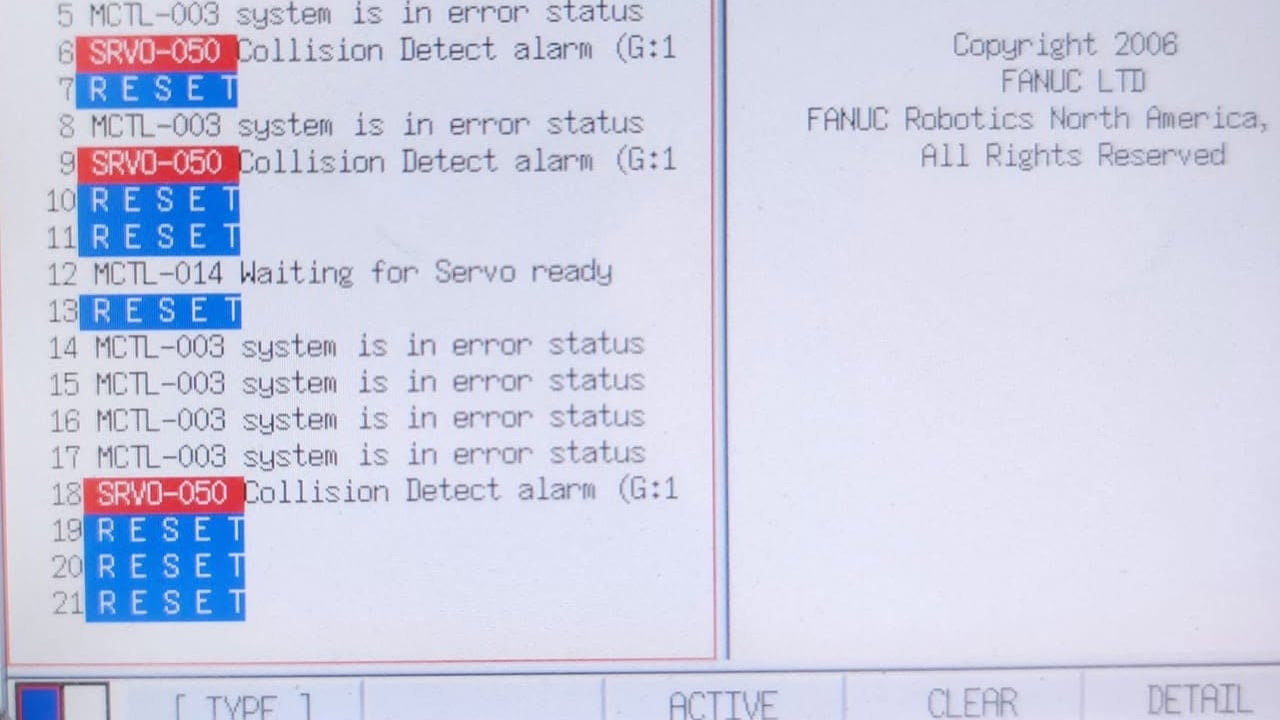
The robot did not crash, why would it report “collision detection”?
To solve the problem, we must first understand the underlying logic of Fanuc. The Fanuc control panel doesn't have eyes, so how does it know the robot has crashed? How does it know that the robot has crashed? It relies on current and torque calculations. When the robot is moving, the system in the control cabinet keeps an eye on how hard the servo motors in each axis are being used (i.e. torque). The system has its own mathematical model of how much force should be applied to each axis at the current speed, angle and load. If, while walking along, the system suddenly realizes, “Something's not right, how come the actual load on one of the axes is so much higher than I predicted?”
The control cabinet will immediately sound the alarm: “Big deal, may have hit something, and then hold back the hard top equipment will be scrapped!” In order to protect the robot's arm, gearhead, servo motors, and front fixture, the system will instantly cut off the servo power, stop the robot with a sharp brake, and throw the SRVO-050.
Therefore, the essence of this alarm is not “I hit something”, but “I move too hard, resistance exceeded”. If for any reason the robot feels “too big and heavy” or “can't get around”, it will mistakenly think it has crashed.
Did it really crash? Let's rule out the obvious.
While we say there are many false positives, the first step is to be realistic. Once an automated production line is up and running, the robot has to work with fixtures, workpieces, machine tools, and safety light curtains, so sometimes even if the tool coordinate system (TCP) is off by two or three millimeters, a minor scrape could occur at a specific location.
If you just changed the program, re-taught the points, or just got a new tooling and report this error, don't rush to suspect the electrical system just yet. Listen to me, cut the robot to manual mode, lower the speed (such as 10% or even 5%), hold the teach pendant a little bit of pointing, people crouch next to carefully watch. See if the fixtures are rubbing on the edges as they come in and out of the machine? Is the air hose stuck in any dead space?
Make sure that there is absolutely no hard mechanical interference, let's look down.
No collision, but “necking”: those hidden external resistances
Just because a robot doesn't touch anything big on the outside doesn't mean that it's “fine” on its own. Often, it is the spare parts on its body pulling back.
In the field can often catch these culprits:
* Pipeline package pulled too tight: robot six-axis rotation, outside the wrapped cable or air pipe length is not enough, like a rubber band as a six-axis dead drag.
* Foreign objects stuck in the drag chain: pipeline drag chain fell into the large pieces of welding slag, screws or debris, resulting in walking certain trajectories when stuck.
* Tooling fixture internal jamming: such as pneumatic gripper inside the spring broken or cylinder stalled, although the surface does not seem to hit, but the fixture itself mechanical friction has exploded.
Although these things are not to the robot deformation, but will let the servo motor to eat a large part of the force, the system calculates the torque exceeded, get, SRVO-050 arrangement. Encountered every time in the same position to report the error, focusing on the robot along the “clothes” (piping package) and fixtures to touch once, very often the naked eye can see the problem.
Easily overlooked culprit: Wrong Payload setting.
This is an area where many veteran repairers tend to roll over. As I said before, the system relies on a “prediction model” to determine whether there is a collision or not, and the core input data of this model is the payload you enter in the system.
The robot has to know: how much weight is hanging from my elbow? Where is the center of gravity of this thing?
Let's take a practical example: you put a 15 kg gripper on your robot, but in the system's payload settings, you save yourself the trouble or forget to change it, and leave the old 5 kg figure in place. That's the end of it. When the robot is moving, the motors have to work very hard in order to shake the 15 kilograms, delivering much more torque than the system expects. The control panel looks at it and says, "No, according to my calculations, I shouldn't have to use so much force to pick up a 5-kg object! It's definitely hit a concrete wall!" So, it went straight to a merciless strike.
This is especially common after a new fixture, an additional torch, a vision camera, or a change in the EOAT (end-of-arm tool) design. Don't be lazy, just change the end and honestly remeasure or enter the correct load and center of gravity of the tooling in the system.
Bigger than small: chronic overloading
There is also the case of a “legacy problem” or a line modification that is the root cause of the problem. The robot was originally designed to handle 20 kg workpieces and ran smoothly. When the factory changed to a new product or a new production line, the workpieces became 30 kilograms. Robot this thing solid, super a little bit of load it can also be humming and humming, many bosses think: “Look, this is not still able to walk it, can be used on the line!”
This is very wrong. At this time the robot is actually every step in the “serious internal consumption”, the motor and reducer in a long-term high-pressure state. It may be fine at first, but as you use it, you will notice that the SRVO-050 is reporting errors more and more frequently, maybe once a day, now three times a week.
This means that the mechanical components have been protesting, long-term so screw, reducer and servo motor life will fall off a cliff, then it is not a reset can be resolved.
The holding brake is not fully open: daily “tug-of-war” with itself.
Each axis of a Fanuc robot has a holding brake. When the robot is about to move, the system sends power to the brake to open it, and then the motor turns again. If there's something wrong with the holding brake circuitry, or if it's mechanically worn or sticky, and the brake doesn't release 100 percent of the way, it's a lot of fun. It's like you're driving a car with the handbrake halfway off and you're still hard on the gas going forward. The motor not only has to deal with the resistance of the work, but also the friction of its own internal brakes. Within a few seconds, the servo torque will soar, the control cabinet directly determine the “collision”.
How can I tell if I have a brake problem? Its typical symptoms are: the robot moves up the sound is very dull, very heavy; feel a particular axis is particularly weak; no matter manually slow swing (Jog), or automatic operation, all in the same axis crazy report SRVO-050. this time to focus on checking the axis of the brake control line and the brake itself.
High and low voltages: making the system “miscalculate”
Many people can not imagine how, sometimes electrical cabinet report collision, but because the plant's power supply voltage is not stable. When the control cabinet input voltage suddenly becomes low or fluctuates greatly, the rectifier out of the DC voltage will follow the drop. Servo amplifier drive capacity a shrinkage, in order to let the robot to maintain the original speed and trajectory, the system can only be forced to increase the current to make up. With this increase in current, the control cabinet's algorithm will misjudge and think that the interference torque is abnormal, and then jump out of the SRVO-050.
If the plant has recently frequent power outages, flicker, or your control cabinet terminals have been aging and hot, cable line with more than ten years, you may want to take a multimeter to measure the main power supply voltage at the moment of the error report. The old plant and summer power peak, this trick has been tried and true.
Ruling out: is it really a bad servo system or cable?
If you have checked all the above mechanical interferences, piping packages, load parameters, voltages, and found that they are all fine, and the robot is still reporting SRVO-050 dead on a fixed axis, then we need to move the electrics to move the real thing.
This usually means that there are hidden faults in the following places:
* Servo amplifier internal component aging, current detection is not allowed.
* Encoder cable or power cable internal broken wire. Sometimes the cable skin looks intact, but when the robot is twisted into a particular attitude, the copper wire inside just breaks off and makes poor contact, and the system instantly catches the anomaly and reports an error.
* Loose feedback plugs or oil and water ingress.
Repair to this point, the most useful trick is the “adjustment method”. For example, one axis and two axis of the motor or cable specifications are the same, try to adjust the wiring in the control cabinet (pay attention to professional operation, make a good backup, to prevent flying), to see if the fault will be transferred from one axis to the second axis. If it follows the transfer, then there is no doubt that it is a cable or amplifier problem.
A common problem with machines over ten years old: severe wear on the reducer
Finally, if the servo motors and circuits are fine, but the robot is a “war veteran” (used for seven or eight years or even more than ten years), and has long been doing spot welding, heavy-duty handling, palletizing and other dirty work, it is most likely that the mechanical wear and tear to the limit. The gears in the reducer are worn out, the bearings are aged and cracked, the lubricating black oil inside is leaking out or has become dry paste, all of which will lead to a sharp increase in internal friction. The robot itself does not know that the stomach is injured, it only thinks “this arm and leg how to be so much heavier than back then”, and the final manifestation is frequent false collision reports.
How to determine the reducer is not working? Listen carefully to it move up there is no “click” or “buzz” metal friction odor and noise; touch the joints is not hot enough to bake eggs; or look at the robot's positioning accuracy is not worse, stopping when the arm is still in a slight The robot arm is still shaking slightly when it stops (the gap is getting bigger). If you get any of these, you should arrange for an overhaul and replace the gearbox.
This error is reported often, can I just block it or ignore it?
Theoretically, you can press `RESET` on the teach pendant and the robot will continue to work. A lot of people try to save money by not stopping as long as they can reset.
But here's my advice: it doesn't happen more than once.
The first time you report an error, it may be an occasional external glitch, and if the reset goes away, it goes away. But if two or three times in a row in the same place to lie down, do not hard top boot. This time will not only seriously slow down your production line beat, and if there is really overloaded, holding brake does not release or reducer dry grinding, you forced to run for a day, you may be directly on the tens of thousands of dollars of motors or gearboxes to completely burned, crushed.
How to prevent this “phantom collision” on a daily basis?
As the old saying goes, the doctor is the cure for the disease. In order to minimize being tossed by SRVO-050 while working, you should keep up with the usual maintenance.
1. Change the parameters must be adjusted: as long as the end fixture is changed or something is added, don't be too troublesome and immediately go to the system to recalculate the Payload.
2. Regular inspection of the piping package: see if there is any wear and tear of the piping in the drag chain, and if the air hose is aging and hardening, or too tight.
3. Strictly on time greasing: according to the official hours of Fanuc, regularly change the grease for the reducer, and observe whether there are iron chips in the black oil discharged.
4. Do a good job of peripheral health: make sure that there is no messy debris within the working range of the robot, and that the positioning pins and inductors on the jigs and fixtures are cleaned regularly, so as not to let the waste materials pile up.
Do these details well, the robot failure rate can plummet, you can also stay up a few shifts less.

