

How to Solve Fanuc Robot Alarm SRVO-058?
People who use FANUC robots, I don't know if you have ever run into this kind of weird thing: in the morning you come to work happily, just as you press the power-on button, the robot gets stuck on the boot screen and won't move, and directly on the teach pendant pops out an SRVO-058.
Many brothers who just entered the industry see the prefix is "SRVO", and their first reaction is: "Finished, is it a crash again?" or "Did the motor burn out?" But running to the site to take a look, the robot is standing straight and stopped in the safety zone, whatever it looked like before powering off last night, it still looks like that now, it basically didn't hit anything at all. At this time, even if you press the reset button until it is broken, this alarm is like welded dead on the screen, and you cannot clear it no matter what, the servo simply cannot get power.
Today let’s have a heart-to-heart chat about what on earth this SRVO-058 actually is. To tell the truth, at the maintenance site, this error is much more grinding than a common crash alarm (SRVO-050). If you look in the wrong direction, and right off the bat go to change the motor or blindly toss the drive around, in the end, you will mostly be busy for a whole day, and upon powering on it is still the original way.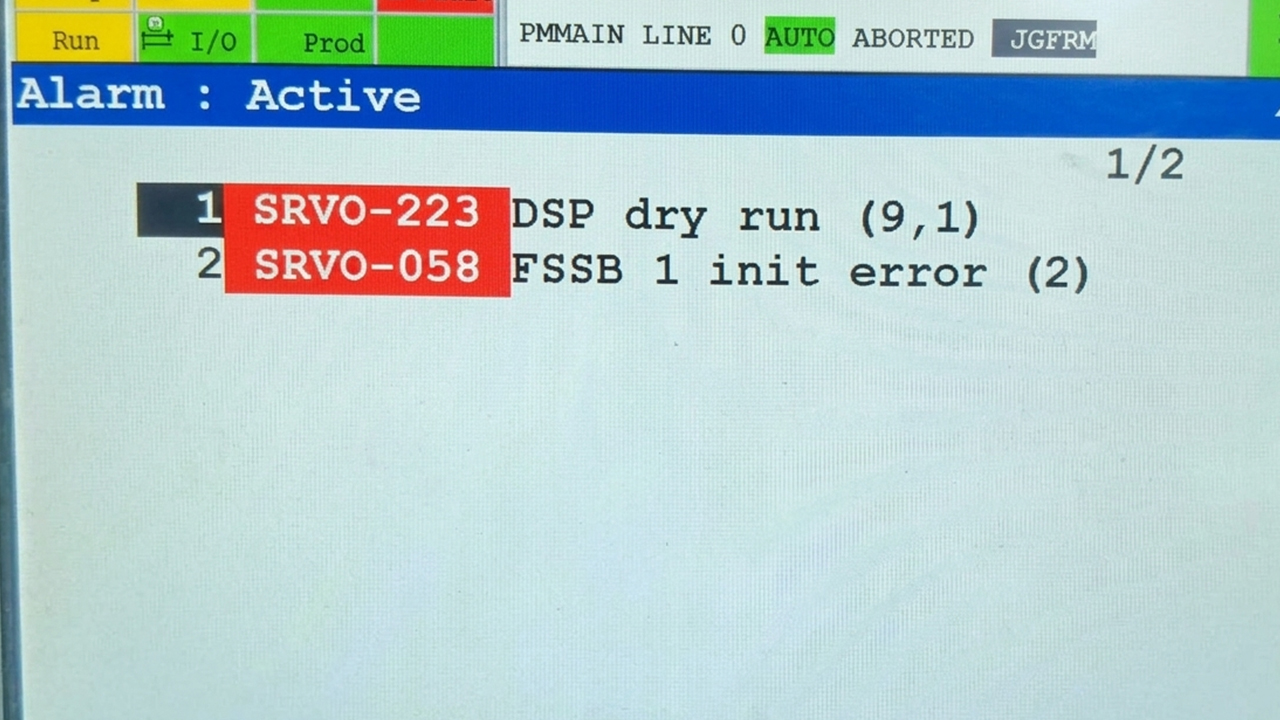
What on Earth is SRVO-058?
FANUC's official definition given to it is: FSSB Initialization Error. Here we must first popularize a concept—FSSB (Fiber Optic Servo Serial Bus). In plain vernacular, it is a "fiber optic high-speed dedicated runway" between the FANUC control cabinet and the servo system.
When the robot powers on, it is not directly able to move, the control cabinet in the background has to roll-call the troops first:
"Is Axis 1 online?" "Here!"
"Is Axis 2 amplifier normal?" "Normal!"
"Is the external rail ready?" "Ready!"
The control cabinet, through this fiber optic cable, establishes connections with all servo amplifiers and axis cards, everyone answered, and only then the system will light up the green light and allow the servo to power on (Servo ON). While SRVO-058 translated is: "During the boot roll-call, someone dropped offline, this communication team didn't build up!" The system, for safety, can only pull the big gate dead. Therefore, this error basically all pops out at that exact instant of just powering on.
Encountering This Error, What is the Scene on Site?
Generally speaking, truly running into SRVO-058, the robot's performances are all quite consistent:
* As soon as the teach pendant screen lights up, before even entering the usual main operation interface, this line of red characters is glaringly lying right there.
* No matter how you press reset, it doesn't even have a tiny "click" brake-releasing sound, and the motor doesn't budge a bit.
* The great restart trick directly fails, power off and wait five minutes to power on again, it still reports without error.
Encountering this kind of tough bone, we have to roll up our sleeves, follow the experience we summed up from rolling and crawling on site, and go step-by-step to troubleshoot.
Don't Panic! Follow These Few Steps to Catch the "True Killer"
Although the error is just a line of words, the places where problems can happen extend all the way from the control cabinet, fiber optics, amplifiers, to the robot's mechanical unit cables. We, in the spirit of the principle "easy first then difficult, outside first then inside", go to check:
Step 1: First go peep at the fuse on the amplifier (the easiest place to be busy for nothing)
Listen to a brother's advice, first don't hurry to tear down the fiber optics, open the control cabinet, and the very first thing is to go see if the fuse on the servo amplifier is burned. If the fuse is broken, the amplifier directly has no power, it naturally "evaporates from the human world" on the FSSB runway. At this time you will find the LED indicators on the amplifier are all black.
Talk of experience: if you truly find the fuse is burned, thousands of times don't silly-mindedly directly change a new one and call it finished. Fuses very rarely burn for no reason, mostly the amplifier internally already has a short circuit or big current impact. Before changing it on, best to use a multimeter to measure the resistance, to avoid putting the new fuse in, and with a "crack" sound it burns again.
Step 2: This delicate fiber optic, is it bent?
FANUC's FSSB communication uses fiber optics to transmit signals. Fiber optics, this thing, its anti-interference ability is indeed awesome, but it also has a fatal weakness: too delicate.
In the workshop, the following several situations I have seen with my own eyes:
* The wires inside the cabinet are too messy, and the fiber optic was bent into a dead corner (the bending radius is too small, light cannot get through).
* When pulling the plug, there was oil on the hand, and directly touched the end face of the fiber optic plug, dirtying it.
* The joint was not plugged tight, loose and sloppy.
* Even worse, when the cable was pulled through the conduit, too much force was used to drag and pull, pulling and snapping the optical fiber inside.
When troubleshooting, smooth along the fiber optic once. If you have a spare fiber optic on hand, directly pull a temporary cross-connection (commonly known as "flying line" test) to see if booting still reports the error. This is the fastest way to verify if the fiber optic is bad.
Step 3: Did the amplifier actually get 24V DC power?
The fiber optic has no problem, then the amplifier must have power to work. Sometimes it is the switching power supply in the control cabinet that is broken, or the 24V power line plug is loose, causing the amplifier to basically not power on. Without even power connected, how can it respond to the control cabinet in the fiber optic network? Take a multimeter to measure the power input end of the amplifier, and see if the 24V DC power is there.
Step 4: Mechanical unit cables worn, grounded
The robot twists and turns on the production line every day, especially six-axis robots, the internal cables of the mechanical unit have to bend hundreds and thousands of times every day. After using for four or five years, situations where the cable's outer skin is rubbed open and metal wires are bare frequently appear.
If just happen to be the wires related to communication or power touched the robot's metal shell (grounding short circuit), once booting detects abnormality, the system will also directly report SRVO-058. If inside your robot's working environment it is full of cutting oil, water vapor, or there are often large-range movements, focus on checking the cable pack at the robot's joints.
Step 5: External "non-staff personnel" dragged the leg
Many production lines not only have the robot mechanical unit, but also are equipped with external axes, positioners, and seventh-axis rails. The servo amplifiers of these peripherals are likewise connected in series inside the FSSB fiber optic network. Even if the robot mechanical unit is perfectly fine, as long as the external positioner's amplifier loses power or the fiber optic breaks, the entire FSSB chain is broken, and the robot likewise will follow to report SRVO-058.
Troubleshooting small trick: first block the communication of the external axes in the system, or physically disconnect them, leaving only the robot mechanical unit, to see if it can boot normally. If the mechanical unit boots up, it shows the problem lies on those peripherals.
Step 6: The least willing to see—hardware burned
If the cables, fiber optics, fuses, and power supplies above all have not a single bit of trouble, then you must make mental preparations:
* The Axis Control Card is broken.
* The communication chip or motherboard inside the servo amplifier is burned.
* The communication port of the control cabinet's Main Board is hung up.
This belongs to a "hard injury", and generally the site does not possess chip-level maintenance conditions. At this time it is not recommended to blindly toss it around, which easily turns small problems into big accidents.
Let's Summarize a Most Time-Saving Troubleshooting Formula
Truly running into this matter, don't blindly spin in circles, follow this order:
1. Look at the lights: open the cabinet door to see if the servo amplifier green light is bright. Not bright? Check the fuse and 24V power.
2. Manage the lines: light is bright but reporting error? See if the FSSB fiber optic has bends, if the plug is loose, or if the end face is dirty.
3. Isolate: for those with external axes, first disconnect the external axes, and try running the mechanical unit alone.
4. Fly the line: take a good fiber optic to directly cross-connect, ruling out cable problems.
5. Swap: if you have multiple identical robots, swap the axis cards or amplifiers, to see if the fault follows.
This Thing, How to Prevent it Normally?
As the old saying goes well, do maintenance before the fault. FSSB problems, actually most can be avoided normally:
* Cabinet dust-proofing must be done sufficiently: don't let iron filings and oil mist in the workshop enter the cabinet, these things are the deadly enemies of electronic components and fiber optic interfaces.
* When moving cables, be gentle: when cleaning the cabinet or routing lines, don't use force to yank the fiber optic, and leave some arc when bending.
* Plug joints tight: after finishing maintenance, press all plugs tight in passing, preventing bad contact after vibrating for a long time.

