

How to Solve Fanuc Robot Alarm SRVO-408?
For guys who work on Fanuc robots, when you run into this SRVO-408 alarm, a lot of people's first reaction is: "Great, the servo motor is throwing a tantrum again?" After all, the code starts with SRVO, so it's hard not to think of the servo. But let me pour some cold water on you: this alarm really doesn't have much to do with the servo motor or the servo amplifier — it's actually an alarm that pops out of Fanuc's DCS safety system.
Of the SRVO-408 cases we've handled on the shop floor, nine and a half out of ten turn out, in the end, to be issues with the safety circuit or the DCS configuration — not a motor failure at all. So today I'm going to break this down piece by piece and talk with everyone about what's really hiding behind SRVO-408, and where to start when you run into it, so you don't waste effort blindly tearing apart the servo and end up delaying production for nothing.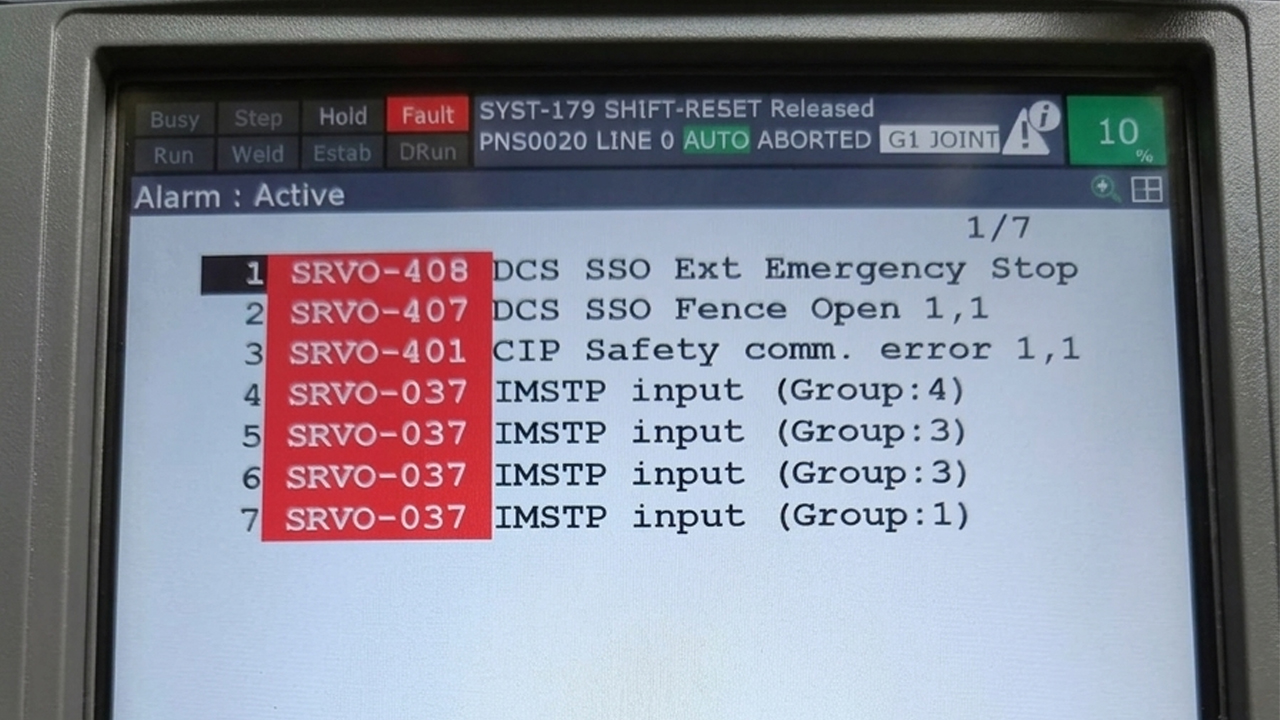
What does the line on the screen, "SRVO-408 DCS SSO Ext Emergency Stop," actually mean?
First, remember this one sentence: SRVO-408 = DCS SSO External Emergency Stop = the safety output SSO[3] has been pulled to the OFF state. There are two terms here you need to understand first: DCS and SSO.
DCS, short for Dual Check Safety, is a set of safety functions within the Fanuc robot control system. Through redundant signals, safety monitoring, and safety I/O, it keeps watch over the robot's motion and safety status, in order to prevent the robot from going out of control and hurting someone or crashing into equipment. As for SSO, you can think of it as a type of safety output signal within the DCS system — essentially a "safety flag" that DCS sends out.
In the SRVO-408 alarm, Fanuc is specifically referring to the safety output numbered SSO[3]. When the DCS safety logic determines that the SSO[3] output associated with the external emergency stop has gone OFF, the robot enters an emergency stop state, and the screen lights up with SRVO-408.
So as you can see, this alarm is essentially telling you: the DCS safety logic thinks something is wrong with the safety output tied to the external emergency stop, and it has already cut it off. This is a completely different matter from things like "servo motor overcurrent," "encoder fault," or "amplifier burned out." In the past, when you hit a servo alarm, you might go check the motor, the encoder, the amplifier, the cables. But when you hit SRVO-408, a more reliable approach is to trace along the DCS safety signal chain. Put simply: SRVO-408 → SSO[3] OFF → check Safe I/O Connect → find out what controls SSO[3] → check the corresponding safety circuit.
Why does this alarm always get tangled up with things like emergency stop buttons and safety gates?
On a lot of automated production lines, the Fanuc robot isn't working alone in isolation. It's often surrounded by safety gates, safety light curtains, emergency stop buttons, safety relays, safety PLCs, and sometimes other robots, machine tools, or conveyor lines nearby. These pieces of equipment are connected to the robot control system through safety circuits. A typical safety chain looks like this: emergency stop button pressed → safety relay or safety PLC state changes → safety signal cut off → DCS safety logic detects something wrong → SSO[3] pulled to OFF → SRVO-408 appears.
So when you see SRVO-408, it's true that you should go check the emergency stop and safety devices. But there's one thing that's especially important: you can't just assume that "the safety gate is open, so it must be SRVO-408." Fanuc's DCS has a whole bunch of different safety functions, and there's a string of similar alarm codes too — for instance, ones related to "fence open" or "servo disconnected." When you're actually troubleshooting, don't just circle around at the level of "something's wrong with the robot's safety function" — keep drilling down: exactly which specific safety signal changed? And which SSO does that signal control? Once you've nailed down that level, you can pinpoint the problem accurately.
The most common triggers you'll see on-site, pointed out one by one
1. SSO[3] has genuinely been pulled to OFF
This is the most direct cause, and it's the first thing you need to confirm when troubleshooting SRVO-408. Fanuc's core trigger condition for SRVO-408 is: SSO[3] is in the OFF state. In other words, when you see this alarm, don't rush to suspect the servo amplifier — first go glance at the DCS status to see whether SSO[3] is actually OFF. If it really is OFF, the next step is to find out which safety logic is controlling that output. In some systems, SSO[3] might be tied to a particular safety input, SPI, or it might be controlled through logic relationships within Safe I/O Connect. Exactly how it's configured depends on how that particular robot's safety design was set up originally. So don't assume you can apply one fixed I/O number across every machine.
2. The safety input tied to SSO[3] has dropped to OFF
Once you've located SSO[3], the next step is to see what's controlling it. This step is especially critical during troubleshooting. For example, say a particular Fanuc robot has SSO[3] linked to a safety input, SPI. If that SPI goes OFF because some external safety condition isn't met, the DCS logic will naturally set SSO[3] to OFF as well, ultimately triggering SRVO-408.
In this case, the actual point of failure might not be inside the Fanuc control cabinet at all. It could be that the external emergency stop circuit hasn't been reset, the safety relay hasn't pulled back in, the safety PLC hasn't output the correct safety signal, a wire on the safety input has broken, some safety switch is still being held down and hasn't been released, or a connector has a poor connection. So when troubleshooting, it's best to work through the signal path section by section, rather than jumping straight to swapping out hardware.
3. There's a fault in the external emergency stop circuit itself
The emergency stop system within the robot cell is an area that needs special attention for SRVO-408. When an operator presses the emergency stop button, the safety relay opens, the robot controller receives the corresponding safety status, and the DCS carries out a safety stop — that's the safety function working normally, nothing wrong there. The problem arises when the emergency stop button has already been released, but the safety chain hasn't fully recovered. For instance, the emergency stop button might be mechanically reset, but the safety relay hasn't reset; or the safety PLC still thinks some safety condition hasn't been satisfied. In this case, the robot still won't move, and it will keep generating safety alarms.
So during troubleshooting, don't just stare at whether the emergency stop button has popped back out — you need to confirm that the entire safety circuit has recovered. You can check things in this order: emergency stop button → safety relay → safety PLC → safety input → DCS Safe I/O Connect → SSO[3]. If any link along the way hasn't recovered, the robot can't get back to a normal safety state.
4. The DCS Safe I/O Connect configuration has been tampered with
If the robot has been running fine all along and has only recently started throwing SRVO-408 frequently, and someone has touched the controller configuration, then the DCS configuration deserves close attention. For example: the DCS safety I/O was modified, the controller was swapped out, a robot backup was restored, the safety PLC program was changed, the robot workstation was reconfigured, an external safety device was replaced, or the robot system was recommissioned. This applies especially to secondhand Fanuc controllers that were previously mounted on a different robot system and later removed and installed on new equipment — you need to verify whether the original DCS safety configuration actually matches the safety design of the current machine.
The timing of when the alarm appears is itself an important clue. If the machine hasn't had this problem in years, and SRVO-408 pops up the moment a controller is swapped in, you should first check the controller's DCS configuration and safety I/O status, rather than suspecting the robot's servo motor.
5. The safety PLC or another external safety device isn't giving the correct status
Nowadays a lot of robot workstations use a safety PLC. If Fanuc's DCS is connected to an external safety system via signals, then the safety PLC's status will also affect the robot's final safety state. For example: the safety PLC detects that some safety condition isn't met → the safety output doesn't recover → Fanuc's safety input stays OFF → the DCS logic keeps SSO[3] OFF → SRVO-408. In this case, spending all your effort checking Fanuc's servo system is basically wasted work.
If there's a safety PLC on-site, it's a good idea to check the PLC's diagnostic information at the same time, to confirm whether the safety inputs, outputs, and related safety logic are all in the expected state.
6. The Safe I/O Connect logic doesn't match the machine's actual design
There's another situation that's easy to overlook: the DCS safety I/O configuration itself doesn't match the machine's current safety design. For example, the robot may have been reconfigured and the external safety devices changed, but the DCS safety I/O configuration wasn't updated to match; or the controller was restored from an old backup, causing a mismatch between the current equipment and the original safety logic. In this case, the robot itself may have no mechanical or servo hardware fault at all, but the DCS simply believes the safety condition isn't satisfied.
So if you've already confirmed that all the external safety devices are normal, but SSO[3] just won't come back, you need to carefully compare the current DCS Safe I/O Connect configuration against the machine's original electrical drawings, commissioning records, and safety design.
How I generally trace this step by step during troubleshooting
The biggest taboo when handling this type of alarm is "swap a part the moment you see an alarm." The SRVO-408 alarm has already spelled it out clearly for you: SSO[3] OFF. So in actual troubleshooting, you trace backward along this signal.
First, write down the complete alarm log from the teach pendant. Besides SRVO-408, also check whether the alarm history has any other DCS, safety I/O, or emergency-stop-related alarms. Sometimes SRVO-408 is just the final result, and the real culprit may have surfaced earlier.
Next, check the relevant DCS status to confirm whether SSO[3] is genuinely OFF. If SSO[3] is OFF, go on to look through the Safe I/O Connect configuration to find the input or logic relationship controlling SSO[3]. Whatever you do, don't guess or rely on past experience at this step — the DCS configuration can vary enormously depending on the robot model, controller, and workstation. Even if two machines are both Fanuc, their SPI, SSO, and safety I/O assignments might be completely different.
Once you've found the corresponding safety input, check whether it's currently ON or OFF. If that safety input is also OFF, keep tracing outward. For example: SPI OFF → check the safety PLC → check the safety relay → check the emergency stop → check devices like the safety gate and light curtain.
If all the external safety devices are normal but the SPI still won't come back, then you need to go further and check the safety wiring, the connectors, and the DCS configuration. If the external safety system has fully recovered but the DCS status is still off, then put your focus on whether the "Safe I/O Connect" configuration is correct.
This troubleshooting method might look slower than "just swap the servo amplifier," but in practice it's usually faster. That's because you're locating the problem by following the alarm's logic, rather than relying on trial-and-error part swapping.
Can you just hit reset and force it through?
When an operator hits a robot alarm, the first reaction is to press RESET. You can try resetting SRVO-408 too, but simply pressing reset basically won't solve the problem. The reason is simple: if the DCS still detects that SSO[3] is OFF, the safety condition hasn't recovered, and it'll just alarm again right after you reset it. The correct approach is: first restore the safety condition → confirm SSO[3] has returned to a normal state → then reset the alarm → and finally verify the robot's operating status.
Repeatedly pressing RESET, or even continuously restarting the controller, without resolving the root cause of SSO[3] being OFF, is purely a waste of effort. Even more critically, never — just to save time — force-jumper the safety input or arbitrarily alter the safety logic to get the robot moving.
Could the servo motor actually be broken?
Generally, no. Even though the alarm name starts with SRVO, the core definition of SRVO-408 is "DCS SSO Ext Emergency Stop," corresponding to the SSO[3] OFF state within the DCS safety function. So if the robot has only thrown SRVO-408, with no other alarm clearly pointing to the servo system, it's not advisable to jump straight to replacing the servo motor, servo amplifier, encoder, or reducer. These components may be prime suspects in other Fanuc alarms, but for SRVO-408, they're not the first thing to check.
This is also why you often see cases on-site where "the servo amplifier was replaced and it still alarms" — because the problem was never in the amplifier to begin with, and it doesn't matter how many you swap in.
Whatever you do, don't take the shortcut of jumpering the safety signal
SRVO-408 is an alarm related to the robot's safety function, and it shouldn't be treated like an ordinary production alarm. Some people on-site might think: "Why not just jumper this safety signal for now and get the robot running?" This approach is extremely dangerous.
Never force the robot back into operation through methods like these: jumpering the safety input, forcing the safety output to ON, arbitrarily disabling DCS, bypassing the safety PLC, removing the safety gate interlock, or bypassing the emergency stop circuit. These actions can directly destroy the robot's intended safety function. DCS in particular exists precisely to reduce the risk of the robot moving unexpectedly and causing harm. If DCS raises an alarm, the correct approach is to find out why the safety condition isn't being met, not to figure out a way to make the system "ignore" that condition.
If it truly becomes necessary to modify the DCS configuration, that also has to follow the equipment's original safety design, risk assessment, and the corresponding safety commissioning process — it can't be done on a whim.
How to keep it from bothering you so often in daily use
SRVO-408 isn't something you can fully prevent just by swapping out some particular part. It's tied to the state of the entire robot safety system, so routine maintenance needs to cover the safety circuit as well.
For instance, regularly inspect the emergency stop buttons, safety gates, safety relays, safety PLCs, and the related safety wiring. The connectors and safety I/O wiring inside the robot control cabinet also need to stay secure, so that long-term vibration doesn't cause poor contact and produce intermittent safety faults.
If you've made changes to the DCS configuration on a Fanuc controller, it's best to keep a record of the changes and maintain a valid controller backup. In particular, after swapping controllers, restoring a backup, or reconfiguring the robot workstation, you must reconfirm that the DCS safety configuration matches the current machine.
For robots that have been in service a long time, you also need to watch out for aging safety wiring. Long-term vibration, the back-and-forth movement inside cable tracks, oil contamination, and frequent bending can all cause problems with cables or connectors. These issues won't trigger an alarm right away, but they'll eventually show up as unstable safety input states, occasionally producing DCS alarms like SRVO-408.
When should you call in a specialist?
If you've already confirmed that external devices like the emergency stop, safety gates, and safety relays are all normal, but SSO[3] is still OFF, then you need to dig further into the DCS configuration and safety signals.
In particular, if you run into any of the following situations, it's a good idea to bring in an engineer familiar with Fanuc DCS: the robot controller was just replaced; a DCS or system backup was just restored; the safety PLC program was recently modified; the robot workstation was just reconfigured; the DCS Safe I/O Connect configuration is unclear to you; you don't know which safety input controls SSO[3]; all external safety devices are normal but SRVO-408 stubbornly keeps appearing; or the robot has thrown a whole string of DCS-related alarms.
For safety functions, the most important thing isn't "getting the robot moving again as fast as possible" — it's confirming that the safety system has genuinely returned to the correct state.

