

Suunnittelematon pysäytys kuluttaa rahaa minuutissa, ja jokaisen huoltoteknikon näytöllä on aina sama kysymys: mitä tämä hälytys todella tarkoittaa? IRC5-tapahtumalokin oikea lukeminen — eikä uudelleenkäynnistystä ja toivomista — on usein se, mikä erottaa kymmenen minuutin korjauksen päivästä kokeiluja ja osien vaihtoa.
Huomautus sanavalinnoista: Hälytysviestien sanamuoto noudattaa ABB:n ohjeita Käyttöohjeen – IRC5:n vianmääritys , asiakirja 3HAC020738-010, versio V (RobotWare 6.03). Tämän oppaan englanninkieliset viestit on käännetty virallisesta kiinalaisesta versiosta, joten ohjainnäytössä saattaa näkyä hieman erilainen teksti. Vahvista aina viestin sisältö ohjaimen tapahtumalokista ja järjestelmätiedoista.
1. IRC5-tapahtumalokin lukeminen
Tapahtumaloki luetaan FlexPendantilla (lokikatselin/tapahtumien tarkastelija) tai RobotStudiolla kytketyssä tai virtuaalisessa järjestelmässä. Jokaisessa merkintässä on viisi tietoa, jotka tulee lukea yhdessä:
| Kenttä | Mitä se kertoo sinulle |
|---|---|
| Tapahtuman numero | Koodi, esim. 38103— mikä aiheutti hälytyksen |
| Viesti | Lyhyt kuvaus tilanteesta |
| Seuraukset | Mikä tila järjestelmä on siirtynyt (esim. Moottorit pois päältä, järjestelmävika) |
| Mahdolliset syyt | Virheen todennäköisten syiden virallinen luettelo prioriteettijärjestyksessä |
| Suositut toimenpiteet | Virheen korjaamiseen tarkoitetut viralliset tarkistukset ABB:n suosittelemissa järjestyksessä |
Kaksi tapaa erottaa nopea vianmääritys hitaasta. Ensinnäkin lue samanaikaiset tapahtumat — lokitiedot sisältävät useita viestejä samalla ajanhetkellä, ja toinen tai kolmas rivi nimittää usein todellisen syytä. Toiseksi käsittele ensin virhettä sekvenssinä, ei vain viimeistä virhettä lähtökohtana: alapuolella olevat hälytykset ovat usein seurauksia, ei syitä.
Kenttämuistiinpano: kun "ei yhteyttä" tarkoittaa kolmea eri vikaa
Huoltotiimi ilmoitti IRC5-ohjainyksikön menettäneen yhteyden eikä vastaavan FlexPendant-laitteeseen. Tapahtumaloki osoitti päätietokoneeseen, ja yksikön vaihto olisi ollut ilmeinen ensimmäinen toimenpide. Ennen mitään tilausta piirikortti irrotettiin ja tarkastettiin. Kolme erillistä vikaa paljastui:
- Happamat ja osittain huonosti kiinnitetyt pinnit Ethernet-liitännän piirilevyllä , joka katkaisi lähetys- ja vastaanottosignaalien toiminnan.
- Ikääntyneet alajännite-suodatinkondensaattorit, joiden kapasitanssi oli vähentynyt , mikä aiheutti digitaalisen virransyötön aaltomaisuutta piirikortin kytkentäpiireille sietoisemman tason yläpuolelle.
- Käytetty jousikosketin viestintäliittimen kiinnityslevyllä , jonka kosketusvastus oli niin korkea, että se heikensi yhteyttä.
Nämä kolme vikaa eivät ilmeneet tapahtumalokissa. Yhdessä ne aiheuttavat yhden oireen: ei viestintää. Kun piirikorttiviat oli vahvistettu, moduuli vaihdettiin toimivaan päätietokoneeseen – esimerkiksi ABB 3HAC041443-003 DSQC639 -tietokoneyksikköön – ja johtojen liitännät tehtiin uudelleen. Solua ajettiin sen jälkeen kaksi tuntia toistuvilla käynnistys/pysäytys-kiertoilla varmistaakseen, että yhteys pysyi toiminnassa.
Mitä tämä osoittaa: hälytys kertoo, missä oire ilmestyi, ei sitä, mikä sen aiheutti. Ennen kuin tilaat piirikortin, tarkista fyysinen kerros – liittimet, kosketukset ja virransyötön laatu. Huomaa myös, että komponenttitason korjaus ohjausmoduulin sisällä vaatii erikoisosaamista: kokonaisen yksikön vaihto on sekä nopeampaa että turvallisempaa kuin kentällä yritettävä piirikorttitason korjaus.
sijoittelun ja kalibroinnin hälytykset
Tämä hälytysryhmä on yleisin syy siihen, miksi IRC5 ei käynnisty uudelleen virtakytkennän jälkeen – ja suurin osa on peräisin sarjamittauspiirikortin (SMB) järjestelmästä ja sen akusta.
| Koodi | Viesti | Mitä se tarkoittaa | Virallinen toimenpide |
|---|---|---|---|
| 20032 | Kierroslukumittaria ei päivitetty | Yksi tai useampi absoluuttisesti mittaava akseli ei ole synkronoitu | Siirrä akselit synkronointiasentoon ja päivitä kierroslukumittarit |
| 50057 | Liitos ei ole synkronoitu | Virtakatkaisun jälkeen liitoksen sijainti on liian kaukana sijainnista ennen virtakatkaisua | Päivitä kierroslukumittarit uudelleen |
| 50053 | Liian suuri kierroslukulaskurin ero | Käsivarrella tehtiin manuaalinen liike virran ollessa katkaistu; tai SMB-, resolveri- tai kaapelivika | 1) Päivitä kierroslukulaskurit 2) Tarkista resolveri ja kaapelit 3) Tarkasta SMB ja vaihda se vioittuneessa tapauksessa |
| 50296 | Käsivarren muistitiedon ero | Tieto- tai sarjanumerovirhe; SMB tai ohjain vaihdettu, tai konfiguraatio muutettu | Varmista oikeat konfiguraatiotiedot ja sarjanumero; siirrä tiedot alla kuvatulla tavalla |
| 20034 | Käsivarren muisti ei ole kunnossa | Käsivarren muistitiedot poikkeavat ohjaimen tiedoista — SMB:n/ohjaimen vaihdon tai manuaalisen muistin tyhjennyksen jälkeen | Päivitä käsivarren muisti IRC5 Operating -käsikirjan mukaisesti |
| 10039 | Käsivarren muisti ei ole kunnossa (käynnistys) | Sama yhteensopimattomuus havaittu käynnistyksen yhteydessä | Päivitä manipulaattorin muisti |
Terve käynnistys puolestaan näyttää 10038 – Manipulaattorin muisti kunnossa : hyödyllinen vertailukohta, kun haluat tietää, onko SMB-tiedot säilyneet yön aikana. Yhteinen korjaus. Näistä merkintöjä useimmat päättyvät samaan ohjeeseen: päivitä kierroslukumittarit . Robotilla, joka on vain sammutettu (tai siirretty käsin huoltotoimenpiteiden yhteydessä), tämä on koko korjaus. Kun hälytys toistuu tai ilmestyy yhdessä 38103-tyyppisten viestien kanssa, epäile mittausketjua itseään – alkaen ABB 3HAC044075-001 SMB-paristoyksiköstä alhainen akun varaus heikentää SMB:n tallennettuja tietoja ja aiheuttaa juuri nämä kalibrointihälytykset. Akun käyttöikää ei ole julkaistu – vahvista tiedot ohjainyksikön tapahtumalokista ja järjestelmätiedoista.
Vaihdetaanko SMB:tä tai ohjainyksikköä? Tarkista erityisesti mallille 50296 FlexPendantissa, että ohjainyksikköön on ladattu oikeat konfiguraatiotiedot ja sarjanumero. Jos asennat toisesta manipulaattorista peräisin olevan SMB:n, tyhjennä ensin SMB:n muisti FlexPendantilla ja siirrä sitten tiedot ohjainyksiköstä – ei päinvastoin.
3. SMB- ja mittausjärjestelmän hälytykset
| Koodi | Viesti | Seuraukset (versio V) | Viralliset syyt |
|---|---|---|---|
| 38103 | Yhteys SMB:hen katkesi | Järjestelmä siirtyy järjestelmävirheeseen osavaltio | Huono kosketus tai vaurioitunut kaapeli (suojattu) – erityisesti silloin, kun käytetään ABB:n ulkopuolisia ulkoisia akselikaapeleita; SMB-piiri tai akselitietokoneen vika |
Viralliset suositellut toimet esitetään järjestettynä luettelona, ja järjestys vastaa vian diagnosoimista:
- Nollaa kierroslukumittarit.
- Varmista, että SMB:n ja akselitietokoneen välinen kaapelointi on oikein kytketty ja täyttää ABB:n vaatimukset.
- Varmista, että suojakuoren maadoitus on tehty molemmissa päissä.
- Pidä kaapelointi poissa voimakkaiden elektromagneettisten häiriöiden läheisyydestä.
- Vaihda mahdollinen viallinen laite.
Työskentele kyseistä listaa halvemman pään puolelta. Liittimet ja kaapelien suojakuoret maksavat minuutteja; piirit laatat maksavat rahaa ja käytöstä poissaoloa. Ei-ABB-kaapeleita koskeva varoitus ansaitsee erityistä painotusta: akselikaapeleissa, joiden suojakuorta ei ole maadoitettu ABB:n mukaisesti, on klassinen syy siihen, miksi koodi 38103 ilmestyy toistuvasti. Kun tarkastukset viittaavat mittauslaitteistoon itseensä, kyseessä olevat laitteet ovat ABB 3HAC031851-001 DSQC 633A SMB -laite ,ABB 3HAC12815-1 DSQC601 akselitietokone , tai — jos robotti käyttää sitä — ABB 3HAC044168-001 RMU101 -sarjamittauspiiri mikä piiri robottinne käyttää, ei ole julkisesti dokumentoitu — vahvista tämä ohjainjärjestelmän tapahtumalokin ja järjestelmätietojen perusteella.
4. Liike- ja törmäysvaroitukset
| Koodi | Viesti | Virallinen merkitys | Viralliset toimet |
|---|---|---|---|
| 50056 | Liitoksen törmäys | Todellinen vääntömomentti ylittää komennon arvon alhaisella tai nollanopeudella; voi olla lukkiutumavirhe (käsivarsi esteen takana) tai laitevirhe | Tarkista, onko käsivarsi lukkiutunut; tarkista laitteisto; tarkista muut laitevirhetapahtumat tapahtumalogista |
| 50055 | Liitoksen kuorma liian suuri | Virheelliset kuormitustiedot, liiallinen kiihtyvyys, voimakas ulkoinen prosessivoima, alhainen lämpötila tai laitevika | Tarkista kuormitustiedot; vähennä kiihtyvyyttä tai nopeutta; tarkista laitteisto |
| 50052 | Liitoksen nopeusvirhe | Järjestelmävirhe tai ristiriita | Tarkista liitoksen ja laitteiston säätöparametrit sekä ulkoiset voimat; vähennä ohjelmoitua nopeutta |
Virhekoodi 50056 vaatii fyysistä tarkastusta ennen sähköisiä toimenpiteitä — esimerkiksi käsivarren lepääminen kiinnityksessä aiheuttaa saman hälytyksen kuin hajoavan ajoverkkokomponentin vika. Tarkista samanaikaiset laiteviestit ennen kaapin avaamista.
Virhekoodissa 50055 huomaa alhainen lämpötila syy — kylmä teollisuushalli maanantaina aamulla voi todellakin aiheuttaa liitoksen kuormitusvaroituksen robotille, joka toimi moitteettomasti perjantaina. Vahvista havaintosi ohjausyksikön tapahtumalokin ja järjestelmätietojen perusteella ennen mitään tilausta.
5. Ajoverkko- ja moottorivirheilmoitukset
34316 — Moottorivirtavirhe
Seuraus: järjestelmä siirtyy tilaan Moottorit pois päältä . Viisi virallista mahdollista syytä virallisessa järjestyksessä:
- Moottorin tiedot konfiguraatiotiedostossa virheelliset
- Moottorikaapeli huonosti kytketty tai vaurioitunut
- Oikosulku vaiheiden välillä tai maahan
- DC-linkin jännite liian alhainen
- Verkkojännite ei vastaa määriteltyjä vaatimuksia
Suositellut toimet noudattavat samaa järjestystä – tarkista ensin konfiguraatiotiedot, sitten moottorikaapeli, sen jälkeen oikosulut, sitten tapahtumaloki DC-linkin virheen varalta ja lopuksi syöttöverkon jännite. Aloita tapahtumalokista: samanaikainen DC-linkin viesti (34402) muuttaa prioriteettisi heti.
39504 — Jarrun virransyöttö ylikuormitettu
Seuraamus: toiminta ei ole mahdollista ennen korjaamista; järjestelmä siirtyy järjestelmän pysäytystilaan. Viralliset syyt: oikosulku jarrun virransyöttökaapelissa; ulkoisten akselien jarrut kuluttavat liikaa tehoa; tehomoduulin kaapeli ei ole kytketty oikein moottorimoduuliin. Toimenpiteet alkavat kaapelien istutuksesta ja ulkoisen akselin kokonaissähkövirran tarkastukseen ja päättyvät mittaukseen: varmista, että 24 V:n jarrujännite on määritellyn alueen sisällä (piirischemat: katso IRC5-tuotekäsikirjaa).
34402 — Tasajännitteen väylän jännite liian alhainen
Seuraamus: toiminta ei ole mahdollista ennen vian korjaamista — järjestelmä siirtyy moottorit pois -tilaan. Virallinen syy: tasasuuntausyksikön verkkojännite ei ole määritellyn alueen sisällä. Toimenpiteet: tarkista muut virransyöttöön liittyvät tapahtumalokimerkintäviestit; tarkista verkkovirta ja sen sallittu toleranssiraja; varmista muuntajan hyppysiltojen jännitevalinta, jos niitä on asennettu; tarkasta kaikki kolmivaiheiset komponentit moottorimoduulin sisällä (pääkytkin, suodatin, sulakkeet, kontaktori) ja niiden kytkentä.
37001 — Moottorien käynnistyskontaktorin aktivointivirhe
Seuraamus: mekaanista yksikköä ei voida käyttää manuaalisesti tai automaattisesti. Viralliset syyt: kontaktorin käynnistysketju on avoinna; kontaktorissa on mekaaninen tai sähköinen vika; FlexPendantin käynnistyslaite on vaihdettu liian nopeasti tai järjestelmän määrittely on virheellinen. Ensimmäinen virallinen toimenpide on tarkoituksellisesti alateknologinen: vahvista virhe, vapauta käynnistyslaite ja paina sitä uudelleen noin sekunnin kuluttua. Jos virhe poistuu, kyseessä oli ihmistekijään perustuva tapahtuma, ei laitteellinen vika. Jos virhe ei poistu, tarkista turvajärjestelmän kaapelointi, samanaikaiset lokiviestit ja moottorien käynnistyskontaktorin releen järjestelmätoimintomäärittely.
⚠️ Virallinen turvavaroitus (kopioidaan olennaisilta osin käyttöoppaasta): virheille 37001 ja 20212 — älä jatka robotin käyttöä ennen kuin vika on tunnistettu ja poistettu. Ja kaikissa työtehtävissä ajoyksikön sisällä: katkaise virta, lukitse järjestelmä ja anna DC-linjan purkautua ennen kuin kosketat mitään; työt tulee suorittaa koulutettu henkilökunta.
Kun tarkastukset osoittavat ajuri- tai virtalaitteiston vian, vaihtoyksiköt ovat ABB 3HAC029818-001 DSQC 663 -ajoyksikkö tai ABB 3HAC13389-2 DSQC611 -kontaktoriyksikkö , riippuen siitä, mihin ketjun osaan todisteet viittaavat.
6. Turvallisuus- ja järjestelmävaroitukset
| Koodi | Viesti | Mitä tapahtui | Virallinen palautus |
|---|---|---|---|
| 10013 | Hätäpysäytystila | Hätäpysäytyslaite, joka on kytketty ES-tuloon, on avautunut – sisäinen (kaappi tai FlexPendant) tai ulkoinen (asiakkaan kytkentä) | Tunnista, mikä laite aiheutti pysäytystilanteen, sulje tai nollaa se ja palaa moottorien päälle -tilaan ohjausmoduulista |
| 10014 | Järjestelmävirhetila | Liian monta vikaa – tarkista samanaikaiset tapahtumalokiviestit FlexPendant-laitteella tai RobotStudio-ohjelmalla | Analysoi lokitiedosto, korjaa perusviika ja käynnistä uudelleen käyttöoppaan mukaisesti |
| 20212 | Kaksikanavainen viika, suoritusketju | Kummastakaan kahdesta suoritusketjusta ei muodostu suljettua silmukkaa – kytkin suoritusketjussa on viallinen tai ei ole kytketty oikein | Tarkista kaapelointi ja liitokset; käytä samanaikaisia viestejä kytkimen tunnistamiseen; varmista, että kaikki kytkimet toimivat; pidä hätäpysäytyspainiketta painettuna ja nollaa se palauttaaksesi ketjun määriteltyyn tilaan; vaihda viallinen kytkin, jos mikään ei ole löysännyt |
| 20600 | Ei-virallinen RobotWare-versio | Käytössä on testi/validointi-rakennus | Jos tämä on tuotantojärjestelmä, asenna virallinen RobotWare-julkaisu mahdollisimman pian |
10013 on diagnoosi, ei viika: jokin avasi pysäytyspiirin, ja lokitiedosto kertoo sen kummalla puolella — sisäiset laitteet on merkitty piirikaavioon, ulkoiset ovat niitä, jotka olet tai järjestelmän rakentaja olet kytkenyt, ja epäonnistunut ulkoinen ABB CE4T-10R-02 hätäpysäytyspainike on yleinen korvaus. Näillä koodoilla asetetaan seuraavat tilat: 10013 keskeyttää kaikki käynnissä olevat ohjelmat välittömästi ja pitää robotin akselit mekaanisissa jarruissa; 20212 siirtää järjestelmän tilaan SYS HALT; 10014 estää ohjelman suorituksen ja manuaalisen siirtelyn, kunnes uudelleenkäynnistys tehdään. Koodille 20212 pätee sama turvallisuusvaroitus kuin osiossa 5: vika on tunnistettava ja poistettava ennen kuin robotti otetaan takaisin käyttöön.
10014 vaatii kunnioitusta: "käynnistä uudelleen ja katso" on juuri se, mitä viralliset toimet sinua kehottavat tekemään ei ensimmäiseksi — lokianalyysi on ensimmäinen vaihe.
7. Huoltomuistutukset (10106–10112) ja SIS-laskurit
101xx-sarja ei ole lainkaan vika — se on palvelutietojärjestelmän laskuri:
| Koodi | Merkitseminen |
|---|---|
| 10106 | Kalenteripäivien määrä viimeisestä huollosta on saavutettu — huolto on nyt tarpeen |
| 10107 | Kalenteripäiviä jäljellä ennen huoltoa |
| 10108 | Käyttötuntien määrä viimeisestä huollosta saavutettu — huolto nyt tarpeen |
| 10109 | Jäljellä olevat käyttötunnit |
| 10110 | Vaihteiston huolto vaaditaan |
| 10111 | Vaihteiston huolto myöhästynyt |
| 10112 | Järjestelmän päivämäärä/aika vaihdettu — häiritsee SIS-kalenterin ilmoituksia |
Kolme lukuarvoa toimii rinnakkain: kalenteriaika ,käyttöaika , ja vaihteiston kunto . Jokaisen niistä toiminta on sama: suorita huolto ja nollaa vastaava SIS-lukuarvo; koodille 10112 tarkista SIS-kalenterin raja-arvot ja varoitusparametrit.
Mikä väliaika on: ei julkinen dokumentaatio — vahvista tietoja ohjaimen tapahtumalokista ja järjestelmän tiedoista. Jokainen väli on järjestelmässä määriteltävissä , ja käyttöopas tulostaa laskurit tarkoituksellisesti paikkamerkkeinä. Lue numerot omasta ohjaimen SIS-näytöstä, ja pidä pölyisistä tai lämpötilan kannalta vaativista ympäristöistä syynä välien lyhentämiseen eikä pidentämiseen. Pölynhallinta alkaa kaapin hygieniasta, mukaan lukien esimerkiksi ABB 3HAC028815-001 pölysuodatin varustettuihin kaappeihin.
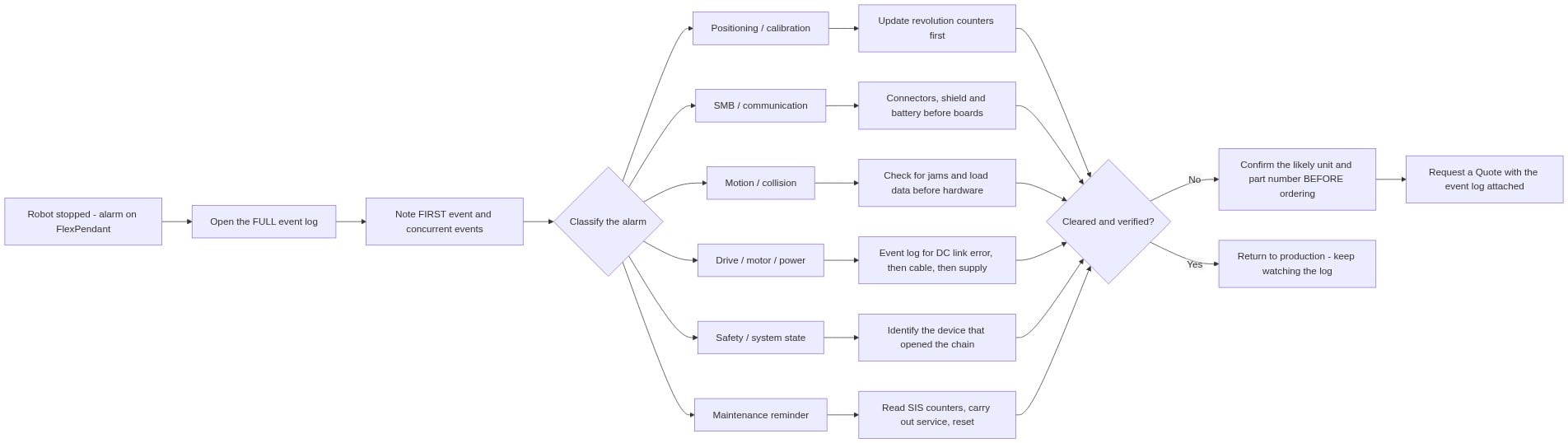
8. Käytännöllinen viisivaiheinen vianetsintätyönkulku
- Lue KOKO tapahtumaloki — ei vain viimeistä riviä. Merkitse muistiin ensimmäinen tapahtuma ja kaikki samanaikaiset viestit.
- Luokittele hälytys: sijainti / viestintä / liike / moottori / turvallisuus / huolto. Luokka määrittää tarkistukset.
- Tarkista edullisin mahdollinen syy ensin : akku → liitin → kaapeli → piiri. Viralliset toimenpideohjeet osioissa 2–6 on jo järjestetty tähän tapaan.
- Vahvista ennen uudelleenkäynnistystä. Uudelleenkäynnistys, joka "korjaa" laiteviat, ei ole korjannut sitä; se on vain siirtänyt sen ajalleen.
- Tarkista korjauksen jälkeen — suorita solu useita kertoja lähtö/pysäytys-kiertoja ja tarkkaile lokitiedostoa, ennen kuin katsoo tehtävän valmiiksi.
9. Kun hälytys tarkoittaa vaihdettavaa osaa
Nollaa ja käynnistä vs. vaihdettava osa
| Kaari | Tarkoittaa yleensä | Sinun vuorosi |
|---|---|---|
| Hälytys virtapiirin kytkemisen jälkeen, robotti liikutettu käsin | Synkronisaatio menetetty | Päivitä kierroslukumittarit – osia ei tarvita |
| 10013 / 10014 operaattorin puuttumisen jälkeen | Oikea järjestelmän vastaus | Tyhjennä laite, käynnistä uudelleen – osia ei tarvita |
| 38103 palaa kaapelin/suojan tarkistusten jälkeen | Mittausketjun laitteisto | SMB-yksikkö tai akselitietokone – vaihda ensin halvempi kappale |
| 34316 vahvistetun vaihe- ja maasulun kanssa moottorikaapelissa | Vaurioitunut kaapeli / moottori | Kaapeli ensin, sitten moottori – tilaa robottimallin mukaan |
| 37001 kestää yhden sekunnin kerran toiminnalle ottavan laitteen uudelleenkäynnistyksen | Kontaktori tai käynnistysketjun kytkin | Kontaktoriyksikkö / painonappi – älä käynnistä ennen kuin se on poistettu käytöstä |
| 50053 ilmestyy toistuvasti | SMB, resolveri tai kaapeli | Vaihda viallinen osa kaapelitarkistuksen jälkeen |
Yhdistetty osaluettelo (yksiköt, joita viitataan tähän opasta)
- ABB 3HAC041443-003 DSQC639-tietokoneyksikkö — päätietokone; korvaa moduulin, kun viestintävirheet vahvistetaan piiritasolla
- ABB 3HAC044075-001 SMB-akkuyksikkö — suojaan SMB:n tallentamia tietoja; alhainen akkujännite aiheuttaa kalibrointihälytyksiä
- ABB 3HAC031851-001 DSQC 633A SMB -yksikkö — sarjamittauspiiri manipulaattorissa
- ABB 3HAC12815-1 DSQC601 akselitietokone — mittausketjun ohjain kaapissa
- ABB 3HAC029818-001 DSQC 663 -ajoyksikkö — akselimoottorin virran ja ajojärjestelmän vikojen hallintayksikkö
- ABB 3HAC13389-2 DSQC611 kontaktoriyksikkö — moottoreiden päälle -koskettimen laitteisto
- ABB CE4T-10R-02 hälytyspysäytyspainike — ulkoinen pysäytyspiirin laite
Korjaa enkooderi vai vaihda moottori?
IRB 6640 -robotti, joka toimi painovalugosolussa, menetti akselin 6 moottorinsa. Syy ei ollut sähköinen: kestävä korkea ympäristön lämpötila yhdistettynä pölyn tunkeutumiseen oli heikentänyt moottorin sisällä olevaa enkooderia.
Tiimi päätti asentaa uuden alkuperäisen moottorin. Päätöksen tekijä oli pysäytysaika, ei osien hinta – enkooderin korjaaminen vaatii moottorin irrottamisen, purkamisen, enkooderin hankinnan, uudelleenrakentamisen ja uudelleenvarmistamisen, kaikki sen aikana kun solu oli pysäytetty.
Miten tehdä sama päätös: vertaa tuotantolinjan pysäytysaikaa korjaamisen ja vaihtamisen hintaeron kanssa. Ja jos ympäristö on se, joka tuhosi ensimmäisen moottorin, käsittele myös syytä – tiukennus, ilmanotto, ympäristön lämpötila – tai sinun täytyy tehdä sama työ uudelleen pian.
Et varma, tarvitseeko vikaesi uutta SMB-akkuja, SMB-korttia vai ajomoodulia? Lähetä meille robottimallisi, ohjain tyyppi ja hälytyskoodi.
Ennen tilausta – TBC-tarkistuslista
- [ ] Robottimalli ja ohjain tyyppi vahvistettu (IRC5 vs IRC5C, RobotWare-versio)
- [ ] Täydellinen tapahtumaloki on vietävä ulos, mukaan lukien samanaikaiset viestit
- [ ] Yksikön osanumero luettu fyysisestä kyltistä asennetusta yksiköstä, ei muistista
- [ ] Onko robottisi käyttänyt SMB-korttia vai RMU101-konfiguraatiota – vahvista ohjaimen järjestelmätiedoista
- [ ] SIS-välit luettu omasta ohjaimestasi, ei mistään julkaistusta tiedosta
- [ ] Ympäristötekijät (pöly, lämpötila, kaapelointi) on otettu huomioon, tai vaihto ei ratkaise ongelmaa
10. Usein kysytyt kysymykset
Mitä ABB-varoitus 20032 tarkoittaa? Varoitus 20032 tarkoittaa, että yksi tai useampi absoluuttisen mittauksen akseli ei ole synkronoitu – kierroslukumittarit täytyy päivittää. Siirrä akselit synkronointiasentoon ja päivitä lukumittarit; varoitus itse ei viittaa vialliseen komponenttiin.
Voinko jatkaa robotin käyttöä varoituksen 50057 ollessa voimassa? Ei. Varoitus 50057 (liitos ei synkronoitu) tarkoittaa, että liitoksen sijainti virtakatkaisun jälkeen poikkeaa liian paljon sijainnista ennen virtakatkaisua, ja automaattinen toiminta ei saa jatkua ennen kuin kierroslukumittarit on päivitetty uudelleen. Korjaus on menettelyllinen, ei osien tilausta vaativa.
Kuinka usein ABB SMB-paristoa tulisi vaihtaa? Ei ole kiinteää vaihtoväliä – se riippuu käyttötaajuudesta eikä sitä ole julkaistu virallisesti; tarkista tapahtumaloki ja järjestelmätiedot ohjaimesi kautta. Heikko paristo ilmenee sijainti- ja kalibraatiovaroituksina (20032, 50053, 50057), jotka ilmestyvät virtakytkentöjen yhteydessä.
Miksi hälytys 38103 ilmestyy jatkuvasti uudelleen? hälytys 38103 ilmestyy uudelleen, kun sen taustalla oleva syy on edelleen olemassa — useimmiten kyseessä on kaapelointiongelma: suojakuoren kiinnitys puuttuu molemmista päistä, kaapeli on vaurioitunut tai ulkoinen akselikaapeli ei ole ABB:n valmistama eikä se täytä ABB:n vaatimuksia. Työskentele virallisella luettelolla järjestyksessä (liittimet → suojakuori → häiriöt → kortit); jos kaapelointi on kunnossa, SMB-kortti tai akselitietokone ovat jäljelle jääneet epäillyt komponentit.
Kohtaako uudelleenkäynnistys kaikki IRC5-viat? Ei. Uudelleenkäynnistys ei poista mitään fyysisesti aiheutuvaa vikaa — se poistaa vain tilan. Käsikirjan oma ohje hälytykselle 10014 (järjestelmävika) on analysoida tapahtumaloki ja korjata ensin taustalla oleva vika. Jos hälytys katoaa uudelleenkäynnistyksen jälkeen ja ilmestyy uudelleen, pidä toistuvaa ilmestymistä diagnoosina.
Miten poistan huoltomuistutuksen 10106? koodi 10106 poistuu, kun huoltotoimenpide suoritetaan ja vastaava SIS-laskurin arvo nollataan – kyseessä on huoltomuistutus, ei virhe, joka voidaan ohittaa. Jos järjestelmän päivämäärää on muutettu (koodi 10112), tarkista myös SIS-kalenterin raja-arvot ja varoitusparametrit, jotta aikapohjaiset muistutukset toimivat jälleen oikein.
Mitkä varaosat tulisi pitää varastossa IRC5-ohjainjärjestelmää varten? Pidä varastossa ne osat, joiden vikaantuminen pysäyttää tuotannon ja jotka voidaan vaihtaa nopeasti paikan päällä: SMB-paristoyksikkö, hätäpysäytyspainike ja – riippuen siitä, kuinka paljon tuotantokatkosta voidaan sietää – tietokoneyksikkö, SMB-kortti ja ajomoduuli. Tarkat osanumerot, jotka sopivat koneisiisi, eivät ole julkisesti dokumentoituja – vahvista ne ohjainjärjestelmäsi tapahtumalokin ja järjestelmätiedon perusteella ennen tilaamista.
11. Edelleen vaikeuksissa? Lähetä meille tapahtumalokisi
Näetkö edelleen hälytystä, jota et voi poistaa?
Lähetä meille tapahtumalokisi ja ohjainjärjestelmäsi tiedot. Tiimimme auttaa sinua tunnistamaan todennäköisesti viallisen yksikön ja vahvistamaan oikean osanumeron ennen tilaamista.
Katso täydellinen hälytysluettelo ja jokaisen koodin virallinen kuvaus ABB:n käyttöohjeesta – IRC5:n vianmääritys, 3HAC020738-010. Tämä opas on itsenäinen vianmääritysresurssi; ABB-muistiinpanot ja tuotenimet ovat vastaavien omistajien tavaramerkkejä. Työt ohjaimen sisällä saa suorittaa vain koulutettu henkilökunta, joka on katkaissut virran ja tyhjentänyt DC-linkin.

